NBA Streaming Guide 2026: How to Watch Live Basketball With IPTV

NBA Streaming Guide 2026: How to Watch Live Basketball With IPTV
Introduction
Watching live NBA basketball has evolved far beyond traditional cable packages. As we move deeper into the 2026 season, basketball fans are increasingly turning to modern streaming setups for their flexibility and broad device compatibility. Internet Protocol Television (IPTV) is at the forefront of this shift, offering an alternative that allows viewers to stream sports content directly over their internet connection without the need for a satellite dish or expensive, long-term cable contracts.
However, an optimal viewing experience is never guaranteed simply by cutting the cord. When the clock is winding down in the fourth quarter, the last thing you want is for your screen to freeze.
Your ability to enjoy a smooth, high-quality basketball game depends on a chain of interconnected technical factors:
- The overall capacity and infrastructure of the IPTV service provider
- The legitimate availability of the broadcast in your specific region
- The raw speed and consistent stability of your home internet connection
- The hardware decoding capabilities of your streaming device
- The efficiency and compatibility of your chosen IPTV player application
- The selected streaming resolution (such as HD, Full HD, or 4K)
- The level of network congestion within your home and at your local ISP
- The quality of your Wi-Fi signal or Ethernet connection
It is essential to understand that no single IPTV service can magically bypass broadcast blackout rules or guarantee that every single NBA game will be available flawlessly worldwide. Game availability depends entirely on the provider's legitimate programming rights, your geographic location, and the specific networks included in their channel lineup.
Experience Premium IPTV Streaming in 4K
Get instant access to live channels, movies, and sports in crystal-clear 4K & HD. Watch without interruptions.
Quick Answer: Can You Watch NBA Games With IPTV?
Yes, IPTV can be an effective way to watch live television and sports streams, including NBA games, provided that the networks broadcasting the games are legitimately included in your chosen service's channel lineup.
However, access alone does not equal a good experience. To ensure the stream remains stable, you must have a reliable internet connection that can handle continuous live video data. You must also use a capable streaming device and a high-quality IPTV player. If any link in this technical chain breaks down, you will likely experience buffering or resolution drops during the game.
How IPTV Works for Live NBA Basketball
Understanding the basic technology behind IPTV helps explain why stream stability is so crucial for live sports.
Unlike traditional cable television, where a dedicated signal is pushed through a physical wire directly to your receiver box, IPTV relies entirely on your broadband network. The delivery process looks like this:
Internet Connection → IPTV Service Servers → IPTV Player Application → Streaming Device → Television
Each component plays a vital role:
- Internet Connection: This is the digital highway that transports the live video data into your home.
- IPTV Service: This is the provider hosting and distributing the live video stream.
- IPTV Player: This is the software (such as Tivimate, IPTV Smarters, etc.) that decodes the stream and provides the user interface (like the TV guide).
- Streaming Device: This is the hardware (like a Smart TV, Android Box, or Firestick) that runs the application and pushes the final image to your screen.
If a basketball game starts lagging, the bottleneck could be occurring at any of these stages. If you are new to this technology, you can learn more about the basics in our article explaining what VOD is in IPTV.
What Should You Look For in an IPTV Service for NBA Games?
If you are setting up a system specifically for the basketball season, you need to evaluate potential providers carefully. Here are the key factors to consider:
- Relevant Sports Programming: Check if the major networks that traditionally broadcast NBA games (such as ESPN, TNT, ABC, or NBA TV) are legitimately included in the channel list.
- Consistent Stream Stability: The service must be able to handle high-traffic events without constant buffering.
- High-Resolution Options: Ensure the provider legitimately offers HD, Full HD, or 4K streams where available.
- Device Compatibility: Ensure the service works seamlessly with your preferred hardware (Smart TV, Firestick, Android TV).
- Electronic Program Guide (EPG): A working TV guide is essential so you know exactly when tip-off happens.
- Responsive Customer Support: You want access to real humans who can assist you with technical issues.
- Trial or Testing Options: Look for services that offer a trial period so you can test the stability legitimately before committing to a long-term plan.
- Transparent Pricing: Ensure there are no hidden activation fees or forced equipment rentals.
- Clear Subscription Terms: Understand the cancellation policies and renewal terms.
- App Compatibility: The service should function well with standard, stable IPTV players.
Does IPTV Include Every NBA Game?
This is perhaps the most misunderstood aspect of streaming live sports. You should never assume that an IPTV service automatically includes every single NBA game being played.
The availability of specific games depends heavily on:
- The provider's current, legitimate programming lineup
- Your geographic location and associated regional restrictions
- Complex broadcast agreements between networks and the league
- National vs. regional broadcast rights
Blackout restrictions that apply to traditional cable and satellite broadcasts can sometimes affect streaming options as well. Always verify the current programming information with the provider before subscribing. Never trust a service that makes absolute guarantees about overriding all broadcast rights.
Why Stream Stability Matters During NBA Games
Live sports, particularly fast-paced games like basketball, are incredibly demanding on a streaming setup.
When you stream an on-demand movie, the video application downloads data ahead of time (buffering in advance). If your internet drops for a few seconds, the movie continues playing seamlessly. Live sports cannot buffer in advance because the action is happening in real time.
Basketball features constant camera panning, rapid player movement, and fast transitions. To render these movements clearly without artifacting (blocky pixels), the stream requires a high bitrate and a continuous, uninterrupted flow of data. Furthermore, major playoff games draw massive audiences, which can strain both the provider's servers and your local ISP's network simultaneously.
If your network is unstable, the live feed will inevitably pause to catch up. For a deep dive into resolving these specific issues, we highly recommend reading our guide on IPTV buffering and how to fix it.
How Much Internet Speed Do You Need for NBA IPTV?
A common misconception is that simply upgrading to the most expensive gigabit internet plan will cure all streaming problems. While high speed is good, it is not the only factor. The required bandwidth depends on the stream's resolution, the compression used, and how many other people are using your home network.
General requirements for live video streaming:
- Standard Definition (SD): Usually requires 5-10 Mbps of stable bandwidth.
- High Definition (HD) / Full HD (1080p): Typically demands 15-30 Mbps of consistent speed.
- 4K Streaming: Can require 50-100 Mbps or more, depending heavily on the bitrate.
However, the most critical factor is consistency and stability.
An internet connection that peaks at 500 Mbps but frequently drops to 2 Mbps will cause a live basketball game to buffer constantly. Conversely, a rock-solid, unwavering 35 Mbps connection will often provide a flawless Full HD streaming experience. Stability is always more important than raw maximum speed when watching live sports.
Ethernet vs Wi-Fi for NBA Streaming
The method you use to connect your streaming device to your router can drastically affect your viewing experience.
Wi-Fi is incredibly convenient, but it is vulnerable to wireless interference. Appliances, Bluetooth devices, neighboring networks, thick walls, and the distance from the router can all degrade the signal. While modern 5 GHz Wi-Fi networks offer excellent speeds, they have a notoriously short range.
Ethernet provides a physical, direct cable connection from your router to your television or streaming device. This completely eliminates wireless interference and ensures the maximum possible stability for your stream.
While Ethernet is highly recommended for live sports streaming, it is not a magic cure-all; if your overall internet speed is terrible, a cable won't fix it. However, plugging in an Ethernet cable is the fastest and most effective way to determine if your buffering issues are simply caused by a weak Wi-Fi signal.
Ready for Superior Picture Quality?
Enjoy buffer-free streaming with our high-bitrate servers and premium bandwidth. Instant setup on all devices.
Is 4K IPTV Worth It for NBA Games?
Watching a basketball game in 4K resolution offers incredible detail, allowing you to see the expressions on the players' faces and the texture of the court. However, there are significant technical hurdles to consider.
First, a 4K television does not magically upgrade the source broadcast. If a network is broadcasting the game in 720p or 1080i (which remains very common), your TV is merely upscaling that image to fit the screen. Native 4K live sports broadcasts are still relatively scarce and depend entirely on the specific network.
Second, a true 4K stream requires massive bandwidth and significant processing power to decode smoothly. A highly compressed 4K stream will often look blurry during fast movement and may buffer frequently. In many cases, a high-bitrate, lightly compressed Full HD (1080p) stream provides a much better, smoother, and more reliable viewing experience than a struggling 4K stream.
Watching NBA IPTV on Smart TV
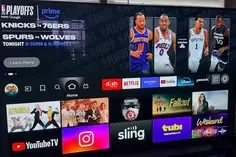 IPTV Smart TV setup for live NBA basketball streaming
For many users, a Smart TV is the preferred method for IPTV because it eliminates the need for extra devices and remotes.
Modern operating systems like LG's webOS, Samsung's Tizen, Android TV, and Google TV usually have extensive support for high-quality IPTV player applications.
However, users must ensure their specific television has the processing power required for live streaming. Older or budget-tier Smart TVs may struggle to decode high-bitrate 1080p or 4K live streams, resulting in jittery video even if the internet connection is perfect. If your TV’s built-in processor is struggling, connecting an external streaming device may be the best solution.
Can You Watch NBA IPTV on Firestick?
The Amazon Firestick is an exceptionally popular device for IPTV setups, and it is fully capable of handling live basketball streams.
When paired with a high-quality IPTV player application, a Firestick offers a powerful, affordable streaming solution. Because Firesticks are designed to connect primarily via Wi-Fi, it is absolutely critical that they receive a strong, unobstructed signal from your router.
If your router is located far away, you may experience buffering. For maximum stability during important games, users can purchase an official Amazon Ethernet adapter for their Firestick. For more detailed setup instructions, you can review our installation guides.
How to Prepare Your IPTV Setup Before an NBA Game
 Optimized IPTV setup for watching live NBA games
There is nothing worse than dealing with technical glitches five minutes before tip-off. Follow this practical checklist a few hours before the game to ensure your setup is ready:
- Restart the router if needed: Power cycling clears out temporary network congestion.
- Restart the streaming device: Reboot your Smart TV or Firestick to free up system memory.
- Check internet stability: Run a quick speed test on the specific device you intend to use.
- Close unnecessary apps: Ensure your device isn't running heavy applications in the background.
- Pause large downloads: Stop any massive game updates or file downloads happening elsewhere in the house.
- Test the IPTV service early: Open the application well before the game to ensure the servers are connecting.
- Test the intended channel: Verify that the specific network broadcasting the game is online and stable.
- Check the desired resolution: Test whether your network can currently handle HD or if you need to drop to SD.
- Use Ethernet when practical: If you have the cable, plug it in.
- Update the IPTV player: Ensure your app is running the latest version to avoid known bugs.
- Update device software: Check if your Firestick or Smart TV has a pending OS update.
- Have a backup device ready: Keep a tablet or smartphone handy just in case your main TV acts up.
Why Popular NBA Games Can Be More Difficult to Stream
It is incredibly common for a streaming setup to perform flawlessly all week, only to suddenly buffer during the NBA Finals or a major rivalry game.
This happens because major events drive massive spikes in peak traffic. Millions of extra viewers are streaming simultaneously. This can cause severe congestion at multiple points: the IPTV provider's servers may become overloaded, major internet backbones can slow down, and your local ISP may experience node congestion in your neighborhood.
If the "digital highway" is jammed before the data even reaches your house, your stream will buffer regardless of how fast your personal internet plan is.
What to Do If Your NBA IPTV Stream Buffers
If you run into buffering during the third quarter, use these troubleshooting steps to identify the problem rather than simply waiting for it to resolve itself:
- Test another channel: This determines if the issue is isolated to that specific broadcast or affects the entire service.
- Test another resolution: If the HD stream is buffering, try switching to an SD feed.
- Test another device: Try watching on your phone to see if your Smart TV is the problem.
- Test Ethernet: If possible, bypass your Wi-Fi immediately.
- Check Wi-Fi: Ensure your device hasn't dropped the wireless signal.
- Pause downloads: Ensure nobody else in the house is downloading large files.
- Restart the IPTV player: Force close the app and reopen it.
- Restart the router: A quick reboot can sometimes clear local congestion.
- Check other streaming services: If YouTube or Netflix also buffer, your home internet is likely the issue.
- Determine whether every channel is affected: If only the main sports network is buffering, it is highly possible the issue is on the provider's end due to peak demand.
Choosing an IPTV Player for NBA Streaming
The IPTV player you select acts as the brain of your streaming setup. When evaluating different players, look for these features:
- Device compatibility: Does it run smoothly on your specific operating system?
- Stability: Does the application crash or freeze frequently?
- EPG functionality: Does it cleanly display the Electronic Program Guide so you can find games?
- Playback controls: Does it offer easy channel switching and aspect ratio adjustments?
- Decoder support: Can you switch between hardware and software decoding if the video stutters?
- Hardware acceleration: This is vital for helping older devices decode high-bitrate live streams.
- App updates: Is the developer actively pushing bug fixes?
- Interface responsiveness: Is the menu quick and easy to navigate?
There is no single "perfect" player for everyone. It is often best to test a few different applications to see which one performs best on your specific hardware.
How to Test IPTV Before an NBA Game
Testing your service before the weekend arrives is your best defense against missing the game. We strongly advise users to evaluate their setup thoroughly.
Test multiple channels, including various sports networks and 24-hour news feeds. Test different resolutions to see what your connection can handle. Most importantly, test the service during the evening (peak hours) when internet traffic is highest in your neighborhood. Compare how the service performs on Wi-Fi versus Ethernet.
Finding a bottleneck on a Tuesday evening gives you time to fix it before the big game on Saturday. For a detailed evaluation checklist, read our guide on how to test an IPTV service before subscribing.
How to Choose the Best IPTV Service for NBA Streaming
When selecting a provider, use this practical buyer checklist to make an informed decision:
- Transparent pricing: Avoid services with convoluted pricing tiers or hidden fees.
- Clear channel information: Ensure the sports networks you actually watch are included.
- Device compatibility: Verify that it supports your specific Smart TV or streaming stick.
- Stable streaming: The service must hold up during peak traffic hours.
- Support: Ensure you have access to technical assistance when needed.
- Trial options: Utilize trial periods where legitimately offered to test stability.
- Clear terms: Understand exactly what the refund and cancellation policies are.
- EPG: A functional TV guide is essential for sports fans.
- Suitable picture quality: Ensure they offer legitimate HD options that match your internet capabilities.
Always approach services that make impossible claims—such as absolute guarantees of zero buffering forever—with extreme caution, as the open internet makes such guarantees technically impossible.
NBA IPTV Streaming Troubleshooting Table
Use this diagnostic table to help pinpoint the source of your streaming issues quickly:
| Problem | What It May Suggest |
|---|---|
| All channels buffer | Network or service issue possible |
| Only one NBA stream buffers | Stream-specific issue possible |
| Wi-Fi buffers but Ethernet works | Wi-Fi may be the limiting factor |
| HD works but 4K buffers | Bandwidth/device/stream factors may be involved |
| IPTV buffers while other services work | IPTV/player/stream-specific issue possible |
| Only one device has problems | Device/app issue more likely |
| Every device has problems | Network/service issue more likely |
| Problems appear mainly during major games | Peak demand/network conditions may be involved |
Watching Live NBA Basketball With Smartiflix
NBA IPTV streaming guide for watching live basketball games in 2026
If you are exploring options for the upcoming basketball season, we encourage you to evaluate the Smartiflix service.
When preparing your home entertainment system, it is crucial to evaluate the complete streaming experience. A reliable setup requires more than just a good service provider; it requires a stable internet connection, capable hardware, and a well-configured home network.
We recommend that users verify our current programming by reviewing our features, test their internet speeds, utilize a compatible streaming device, and ensure their IPTV player is fully updated. Testing the service before major games is always the best practice. Should you need any assistance with your setup, you can always reach out to our contact support team.
When considering a Smartiflix IPTV plan, please review the verified service information on our website to ensure it aligns with your specific needs for live sports and television entertainment.
Frequently Asked Questions
Final Thoughts
The way we consume live sports has fundamentally changed, and IPTV can absolutely be a powerful component of a modern live basketball streaming setup. It offers incredible flexibility and device compatibility that traditional cable simply cannot match.
However, a flawless experience requires a solid technical foundation. Game availability will always depend on legitimate programming rights and your location. A stable internet connection is paramount, and utilizing an Ethernet cable can often diagnose or eliminate Wi-Fi-related problems. While 4K streaming is visually impressive, it requires the appropriate source quality and capable hardware to prevent buffering.
We highly recommend testing your complete setup before major games and verifying current programming lineups before subscribing to any service. For those seeking a reliable, high-quality viewing experience, we invite you to review the verified Smartiflix pricing plans and evaluate the service based on transparent technical information.